I’ve been working through a project recently that I ended up creating an interesting abstraction of an assembly/classes between multiple web services projects. I wrote about it initially in Aggregated Web Services Pt I. In this blog entry is going to cover a few things, based on a full end-to-end implementation of a project from the WCF RESTful Web Services, to the ASP.NET MVC Site, and finally the jQuery calling those same services.
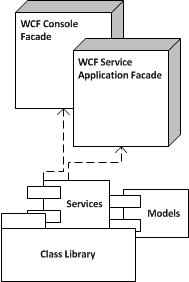
Simple Architecture
Before I got started, there is one thing I need to point out. The communication with Javascript/jQuery/AJAX has a lot of tricky bits one needs to be aware of. One of those is the same site origin and of course the famous cross domain solution issues. That is why in this walk through I will place the web services and the site pages in the same project, yes, WCF and MVC living happily in a single project. 🙂 You can of course, if your architecture requires it, break these into separate projects, but for this example I’ll have both in the same project.
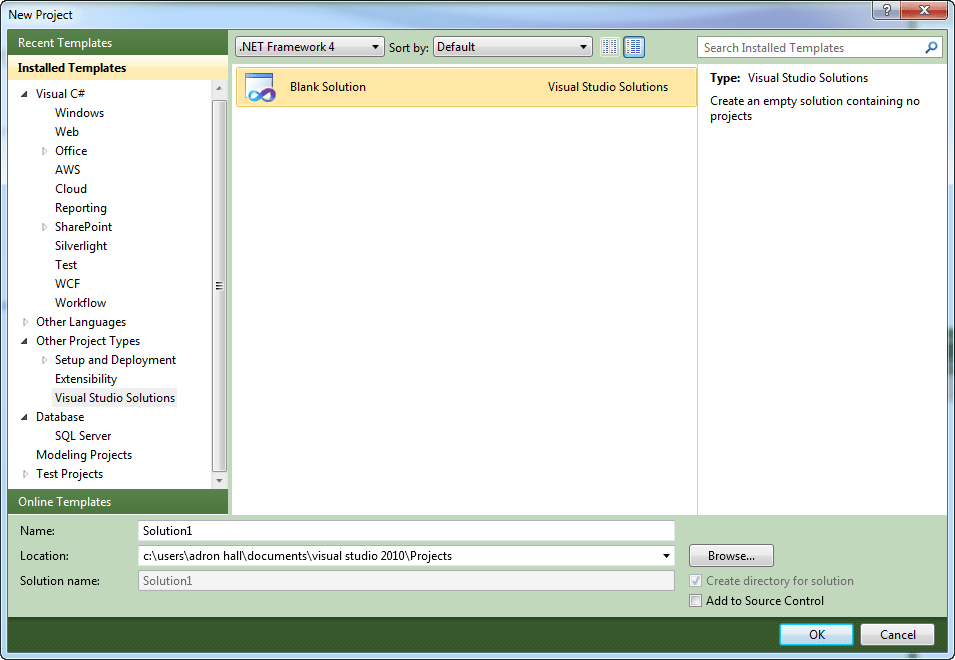
First create a new solution. I always like to start with a new solution because it keeps the naming structured right, just from the practice.
(Click on any of the images to see a larger full size copy)
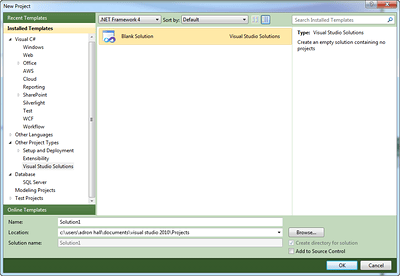
New Solution
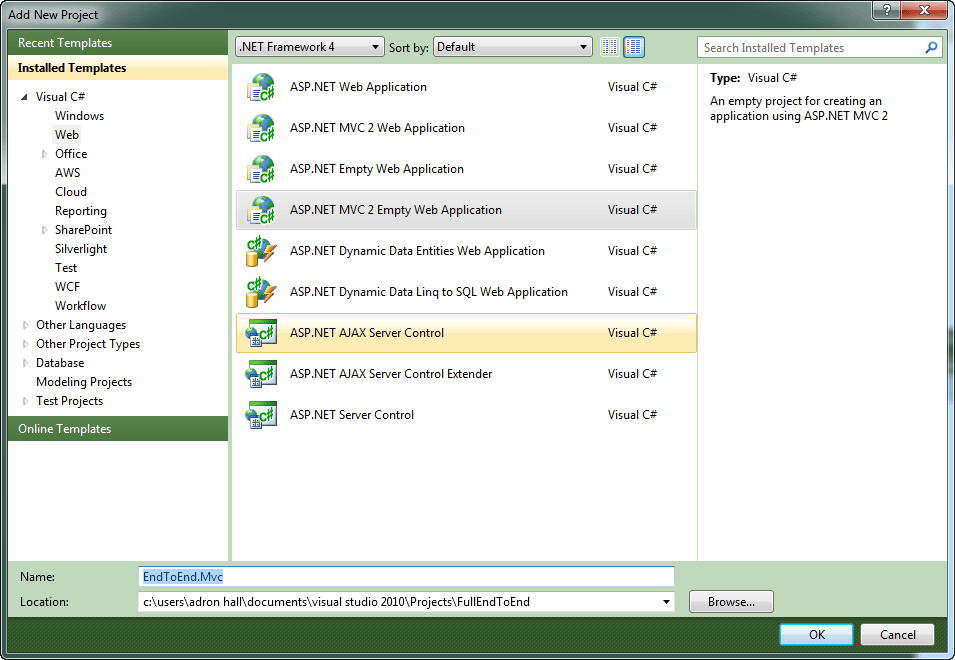
Once you create all of that then add an ASP.NET MVC 2 Project.
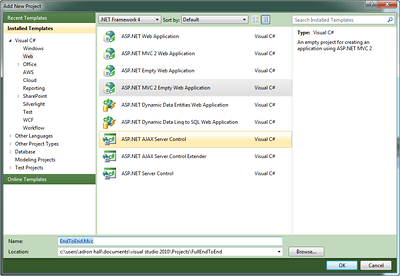
Adding the ASP.NET MVC 2 Project
You can create an ASP.NET MVC 2 Unit Test Project if you want to, but I’m skipping it for now. (yes, I’m still a big TDD advocate, but just setting up a prototype for this example)
Next I wiped out some files I don’t use, and suggest you zap em’ too.
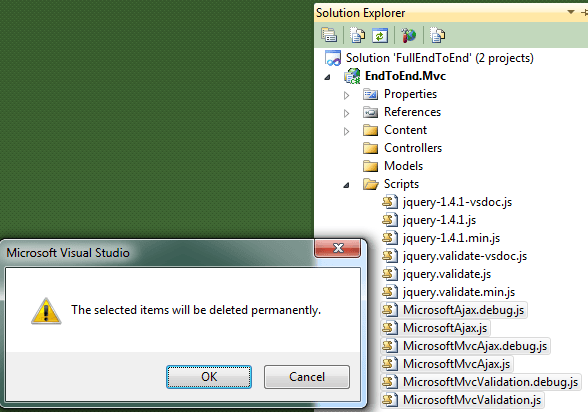
Get Rid of the Nasty MS AJAX
Setting up the WCF Parts
Now that we’ve cleaned up those nasty bits, we’ll add our basic model we’ll be using.
using System;

namespace EndToEnd.Mvc.Models
{
    public class Investor
    {
        public string Id { get; set; }
        public string Text { get; set; }
        public decimal Money { get; set; }
        public DateTime Stamp { get; set; }
    }
}
Now add a interface for the RESTful services to the root of the MVC Project as shown below.
using System.Collections.Generic;
using System.ServiceModel;
using System.ServiceModel.Web;
using EndToEnd.Mvc.Models;

namespace EndToEnd.Mvc
{
    [ServiceContract]
    public interface IEndToEndService
    {
        [OperationContract]
        [WebGet(UriTemplate = "Investors/{pageStart}/{pageEnd}", ResponseFormat = WebMessageFormat.Json)]
        List<Investor> GetIncidents( string pageStart, string pageEnd);

        [OperationContract]
        [WebGet(UriTemplate = "Investor/", ResponseFormat = WebMessageFormat.Json)]
        Investor GetInvestor();
    }
}
Now add the following abstract base class at the root level also.
using System;
using System.Collections.Generic;
using EndToEnd.Mvc.Models;

namespace EndToEnd.Mvc
{
    public abstract class InvestorBase : IEndToEndService
    {
        #region IEndToEndService Members

        public List<Investor> GetIncidents(string pageStart, string pageEnd)
        {
            return new List<Investor>
                       {
                           new Investor
                               {
                                   Id = Guid.NewGuid().ToString(),
                                   Money = (decimal) (DateTime.Now.Second*2.27),
                                   Stamp = DateTime.Now,
                                   Text = "Lorum ipsum 1"
                               },
                           new Investor
                               {
                                   Id = Guid.NewGuid().ToString(),
                                   Money = (decimal) (DateTime.Now.Second*1.32),
                                   Stamp = DateTime.Now,
                                   Text = "Lorum ipsum 2"
                               }
                       };
        }

        public Investor GetInvestor()
        {
            return new Investor
                       {
                           Id = Guid.NewGuid().ToString(),
                           Money = (decimal) (DateTime.Now.Second*1.27),
                           Stamp = DateTime.Now,
                           Text = "Lorum ipsum"
                       };
        }

        #endregion
    }
}
Now add a WCF Service file and remove the interface file. Then change the WCF class itself as shown below. The reasons for the abstract class, inheriting from the interface, is that it removes any manipulation being needed with the actual *.svc file. It just seems, at least to me, a little bit cleaner this way.
namespace EndToEnd.Mvc
{
    public class EndToEndService : InvestorBase
    {}
}
For the last touches for the WCF RESTful Service we need to setup the Web.Config file. I’ve added the section toward the bottom of the config file in the section. I’ve included the full config file below, so you can easily just copy and paste it if you’re working through step by step with me.
<?xml version="1.0"?>
<configuration>
  <system.web>
    <compilation debug="true" targetFramework="4.0">
      <assemblies>
        <add assembly="System.Web.Abstractions, Version=4.0.0.0, Culture=neutral, PublicKeyToken=31BF3856AD364E35" />
        <add assembly="System.Web.Routing, Version=4.0.0.0, Culture=neutral, PublicKeyToken=31BF3856AD364E35" />
        <add assembly="System.Web.Mvc, Version=2.0.0.0, Culture=neutral, PublicKeyToken=31BF3856AD364E35" />
      </assemblies>
    </compilation>
    <authentication mode="Forms">
      <forms loginUrl="~/Account/LogOn" timeout="2880" />
    </authentication>
    <pages>
      <namespaces>
        <add namespace="System.Web.Mvc" />
        <add namespace="System.Web.Mvc.Ajax" />
        <add namespace="System.Web.Mvc.Html" />
        <add namespace="System.Web.Routing" />
      </namespaces>
    </pages>
  </system.web>
  <system.webServer>
    <validation validateIntegratedModeConfiguration="false"/>
    <modules runAllManagedModulesForAllRequests="true"/>
  </system.webServer>
  <runtime>
    <assemblyBinding xmlns="urn:schemas-microsoft-com:asm.v1">
      <dependentAssembly>
        <assemblyIdentity name="System.Web.Mvc" publicKeyToken="31bf3856ad364e35" />
        <bindingRedirect oldVersion="1.0.0.0" newVersion="2.0.0.0" />
      </dependentAssembly>
    </assemblyBinding>
  </runtime>

<system.serviceModel>
  <behaviors>
    <endpointBehaviors>
      <behavior name="httpBehavior">
        <webHttp />
      </behavior>
    </endpointBehaviors>
    <serviceBehaviors>
      <behavior name="ServicesBehavior">
        <serviceMetadata httpGetEnabled="true" />
        <serviceDebug includeExceptionDetailInFaults="true" />
      </behavior>
      <behavior name="">
        <serviceMetadata httpGetEnabled="true" />
        <serviceDebug includeExceptionDetailInFaults="false" />
      </behavior>
    </serviceBehaviors>
  </behaviors>
  <serviceHostingEnvironment multipleSiteBindingsEnabled="true" />
  <services>
    <service behaviorConfiguration="ServicesBehavior"
        name="EndToEnd.Mvc.EndToEndService">
      <endpoint address="" behaviorConfiguration="httpBehavior" binding="webHttpBinding"
          contract="EndToEnd.Mvc.IEndToEndService" />
    </service>
  </services>
</system.serviceModel>

</configuration>
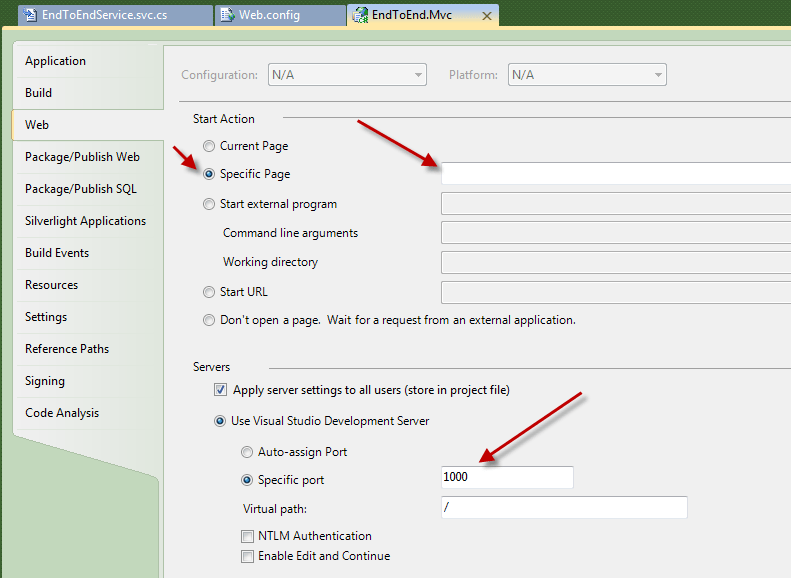
One of the things I always do at this point is to setup the project properties. I do this for a number of reasons, primarily to assure that the port number doesn’t go and change itself on me. The other thing I set is the default startup page. With ASP.NET MVC things get out of sync with Visual Studio, and Visual Studio tries to startup actual *.aspx files. So what I do is just set the startup to an empty root startup. These settings are shown below.
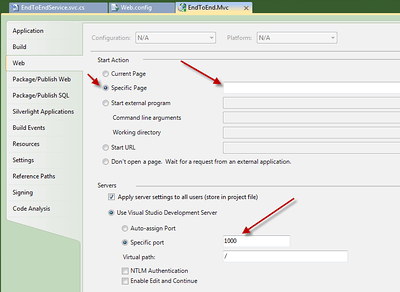
Project Properties
Setting up the MVC Parts
First add a home directory, a HomeController.cs, and then add a Core.Master master page to the project.
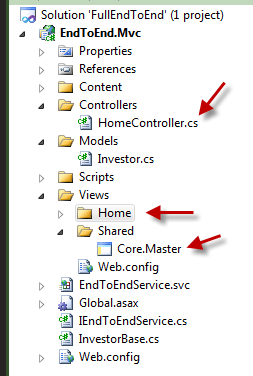
MVC Project Parts
Next setup the Core.Master file with the following content sections.
<%@ Master Language="C#" Inherits="System.Web.Mvc.ViewMasterPage" %>
<!DOCTYPE html PUBLIC "-//W3C//DTD XHTML 1.0 Transitional//EN" "http://www.w3.org/TR/xhtml1/DTD/xhtml1-transitional.dtd">
<html xmlns="http://www.w3.org/1999/xhtml" >
<head runat="server">
<title><asp:ContentPlaceHolder ID="TitleContent" runat="server" /></title>
<script type="text/javascript" src="../../Scripts/jquery-1.4.1.js"></script>
<asp:ContentPlaceHolder ID=HeaderContent runat=server>
</asp:ContentPlaceHolder>
</head>
<body>
<div>
<asp:ContentPlaceHolder ID="MainContent" runat="server">
</asp:ContentPlaceHolder>
</div>
</body>
</html>
One of the things I’ll point out is that with Visual Studio 2010 you get Intellisense with jQuery. The reason I don’t use the x.x.min.js version of the jQuery is that it doesn’t have the appropriate setup to provide the Intellisense. So be sure for development to use the fully expanded version and you can go to the zipped min version when you go live in production. Another thing I do, which may vary on how you want to develop, is use the hosted jQuery on Google or Microsoft. I did a write up previously for using the hosted jQuery so check it out for reference locations.
In the controller add the following code.
using System.Web.Mvc;

namespace EndToEnd.Mvc.Controllers
{
    public class HomeController : Controller
    {
        public ActionResult Index()
        {
            return View();
        }
    }
}
Now that we have the Site.Master and the home controller, create an Index.aspx View in the Home folder of the project.
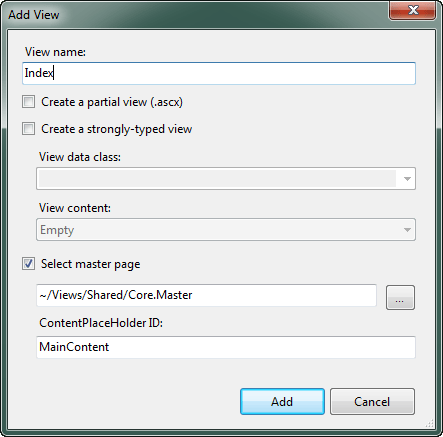
Adding the Index.aspx View
In the view add the following code for the jQuery calls to the services layer.
<%@ Page Title="" Language="C#" MasterPageFile="~/Views/Shared/Core.Master" Inherits="System.Web.Mvc.ViewPage<dynamic>" %>
<asp:Content ID="Content1" ContentPlaceHolderID="TitleContent" runat="server">
jQuery AJAX Calls to RESTful WCF Web Services
</asp:Content>
<asp:Content ID="Content3" ContentPlaceHolderID="HeaderContent" runat="server">
<script type="text/javascript">
var domainRoot = "http://localhost:1000/EndToEndService.svc/";
var investorUri = domainRoot + "investor/";
var investorsUri = domainRoot + "investors/10/15";
</script>
</asp:Content>
<asp:Content ID="Content2" ContentPlaceHolderID="MainContent" runat="server">
<h2>
jQuery AJAX Calls to RESTful WCF Web Services
</h2>
<div id="InvestorUri">
</div>
<div id="InvestorResult">
</div>
<hr />
<div id="InvestorsUri">
</div>
<div id="InvestorsResult">
</div>
<script type="text/javascript">
$('#InvestorUri').html(investorUri);
$('#InvestorsUri').html(investorsUri);
$.getJSON(investorUri, function investor_complete(json) {
$('#InvestorResult').html('<li>' + json.Id + '</li>' + '<li>' + json.Text + '</li>');
});
$.getJSON(investorsUri, function investors_complete(json) {
var builtHtml = ";
$.each(json, function (x, y) {
builtHtml += '<li>' + json[x].Id + '</li>' + '<li>' + json[x].Text + '</li>';
});
$('#InvestorsResult').html(builtHtml);
});
</script>
</asp:Content>
Run it and you should get the following displayed on screen.
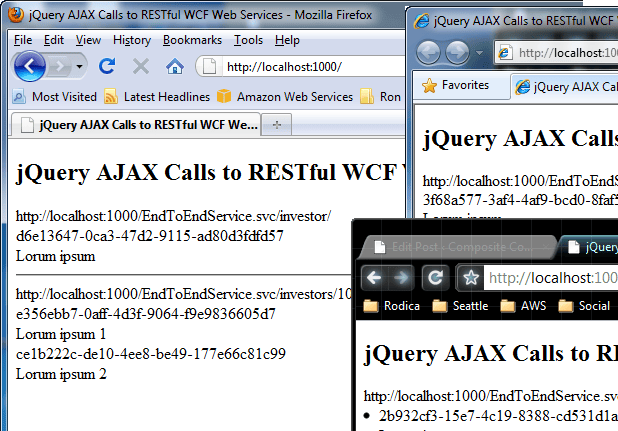
Browser Results
Let me know if you run into any issues trying this out. Thanks!