The Confusions of IaaS, PaaS, and SaaS

IaaS, PaaS, and SaaS stand for Infrastructure as a Service, Platform as a Service, and Software as a Service respectively.  But what exactly is the context & definition of each of these acronyms?  The simple definitions I have included below.

  • IaaS – A service provided by a company, group, community, or government that provides basic computer networking, load balancing, content delivery networks, routing, commodity data storage, and virtualized operating system hosting.
  • PaaS – A service provided by a company, group, community, or government that provides a platform in which to develop software applications, usually web based, with immediate abstractions of the underlying infrastructure.
  • SaaS – A service provided by a company, group, community, or government that provides a software solution to the system clients.  The software may be internal to a business, delivered by other means, or most commonly delivered over the Internet.

IaaS, PaaS, and SaaS are heavily used acronyms in the cloud computing industry.  These three acronyms describe services in particular, but not cloud computing specifically.  It just happens that cloud computing is often broken down into these three segments.  From here on though, I will use IaaS, PaaS, and SaaS in relation to cloud computing.

Windows Azure is highly focused around being a platform.  It has often been said internally and externally at Microsoft that Windows Azure is not infrastructure or software that you can buy, but a platform that software is built to without a need to think about the infrastructure.  Recent events and changes have cast a shadow of doubt on Microsoft’s intentions toward the infrastructure and services aspect of this.  I’ll cover more specifics as I break these services apart.

Traditionally, and even today and ongoing tomorrow, there are a number of existing infrastructure, platforms, and software solutions that are provided in the context of IaaS, PaaS, and SaaS.  These solutions are not always cloud technologies, and can be provided in a number of ways.  Let’s break out the three into the traditional environments that would provide these services.

Traditional Infrastructure

Traditionally infrastructure was, and still today, often provided to companies internally and by 3rd party providers.  These providers, such as small businesses or internal IT Departments, would deliver actual hardware including cabling, architectural design, network configuration & setup, load balancing, hosting of physical servers, data storage in arrays, and other services.  Some examples would be a traditional RAID array with multiple disks, and storing dedicated single copy data as a backup on that array.  Another is documents stored on a file server and backed up to a tape drive.

For further context, take this working example of a very common infrastructure scenario.  An industrial company that makes, manages, and operates the manufacturing of widget X.  The company has a primary office space in an office building in a major metropolitan area.  In that office there are approximately 90 employees.  There is a satellite office with another 25 employees in another part of the city, located about 6 miles from the main office.  These two offices have a combined total of 115 PCs & Laptops.  These machines are interconnected on a network that connects to a collocation facility where the servers are stored & connected to a large pipe on the Internet.  This collocation facility provides the access for all customers via the Internet and also all the access for employees to their internal servers.

In this example we have a number of systems & networking interconnects needed for day to day operations.  This is a very common, and often a rather complex array of services.  This scenario is one that requires a moderate need for Internet infrastructure, but needs mount for file sharing, backups, redundancies, a the ability to startup new servers easily for usage, testing, development, or day to day operations.  The purchase cycle for additional hardware to bulk up this infrastructure isn’t measured in minutes, but is measured in days, weeks, and all too commonly months.

Take another example using a software game company.  This company traditionally delivers games via boxed medium to stores like Target, Wal-mart, or Gamestop.  The game shop is primarily located in a single office with 45 employees.  They have Internet access that connects them to their partners that handle graphics rendering compute time, e-mail & communication server hosting, & other sources.  The backup and storage for their work is on-premises with tape backups, file servers in building, and other equipment for the day to day operations of game development.

This company has needs for a large pipe to their rendering farm partners.  The file servers are local and also require a fair sized pipe to the workstations and huge disks for storing rendered images.  The rendering farm partners have appropriate networking connections on their end for uploading and downloading of their content to this company.  At the end of the development cycle when the game is ready for release they send off the gold copy of the build to manufacturing which is also in another geographic location.  This company then prints the boxes & discs and sends the game out through logistical distribution companies to the stores that will sell the product.

A Traditional Platform

Traditionally a platform was something that consisted of Ruby on Rails, the .NET Framework, Java Server Pages, or PHP.  One had to be responsible for the deployment of these platforms to infrastructure, and all the configuration, maintenance patches, updates, software installation, and other work required staffing at appropriate levels to handle the workload.  The .NET Framework is an example of developing to a platform, and then installing Windows Server (or running it on Mono under Linux), setting up the IIS Server on Windows, then appropriately installing updates, patches, fixes, and other pieces of software.

A great example of real world platform usage is alive in almost all companies to some degree.  Take Visual Basic for Office as an example.  This is often used in offices that have no dedicated development teams, nor any real trained developers.  Visual Basic for Office allowed almost anyone to get up to speed and use very simple programming concepts to get something built using the Microsoft Office Suite as the platform.

A great scenario, and extremely common, is a mid-size enterprise at approximately 170 employees.  In the main office there are a number of people in accounting, sales, support, logistics, marketing, advertising, and other departments.  Each of these departments often have custom needs to deal with their specific business needs within the enterprise.  Sales may want to have an ongoing list of customer contacts and their relation to particular sales people, so one of the sales guys hacks together a solution with Microsoft Office Access.  The next thing everyone in sales is using it.  Going beyond that someone in accounting figures out some cool tricks with Visual Basic for Applications and builds a way to keep in progress work in balance to simplify the daily tracking of numbers.  Again, the next step is other people in the department start using that same application.  Visual Basic for Applications, and the later incarnation Visual Studio Tools for Office is a great example of a software suite that had a platform built on it.

Another common scenario is the business that has grown to about 320 people and starts to migrate some of the rogue databases or custom Visual Basic for Application tweaks into applications that can be formalized and setup for use more easily within the enterprise.  Visual Studio and SQL Server are purchased and development work begins on the .NET Framework to codify these solutions.

The last example is one of the newer platforms out today.  Ruby on Rails started out as a platform to build on that did things in a very simple, minimalistic, rapid manner.  Development was started on the platform by people that eventually formed 37signals.com and built the tools that company sells; Basecamp, Highrise, Backpack, and Campfire.  The Ruby on Rails Platform makes web development faster and easier than it ever has been with traditional software platforms.  It has had such a huge impact that Microsoft has even released competing offerings such as ASP.NET MVC to counter the development patterns and style of the Ruby on Rails patterns.  This platform has some notable applications including Twitter, Yellowpages, Scribd, Hulu, Slideshare, Medhelp, Github, Odeo, Jango, Ravelry, MTV Style and many more.

A Traditional Software Solution

This is the point of all the other layers, the ability to provide software that clients can use to complete daily work, communicate, and create solutions for their business needs.  This traditionally has been provided by installing tools like Microsoft Office, Visual Studio, WordPerfect, Lotus, or other software packages.

This is probably the easiest service type of the “as a Service” differentiations to describe.  It is what is commonly seen by end users.

One of the most common software solutions that is used throughout the world is the Office Suite.  Microsoft’s Office Suite being the most common at this time.  Another great example of a software package commonly used is CAD & Photoshop.  There are literally thousands of other software offerings that are used at home, in the enterprise, or in small businesses every day.
Goals for 2011 (AKA, New Years Resolutions)

In 2010 I made a few goals.

  1. Do more than one speaking engagement and attend a couple conferences.
  2. Look for new opportunities to get back into a truly strong development team as a team member, leader, or director of the
  3. Get involved in user groups and expand my presence in the software industry.
  4. Figure out which way I want to push forward into the year related to occupation, interests, and other facets.

Those were my goals.  I’ve accomplished every one in excess.  So what should I line up for this year?  The grand year of 2011?  Well this is what I’m thinking so far.  As before, I’ll just see how far I can get…

  1. Somehow, in some way, get the tech more closely intertwined with my music.  In other words, I need to get some things recorded ASAP this year.  I’ve spent the better part of a decade completely avoiding this for absolutely ZERO good reasons.
  2. Work to get more conferences, more meetups, and organizations going in the Seattle area that actually have good presence in the social media & community space.
  3. Learn Ruby on Rails to the degree that I could be a fully productive team member, lead, director, or CTO of a company using Ruby on Rails Technology.
  4. Continue to provide whatever type of teaching, mentoring, leadership, or other involvement in the cloud computing space.
  5. Finish my book I’m writing on the Windows Azure Platform.

That’s what I’ve got so far.  I might have to add some to that list.  But for now, that looks solid enough.  🙂   Cheers, and happy new year!

Improving the Time Suck of Social Media

Social media, albeit being a great boon in many regards, has also become a massive time suck for almost everyone involved!  Sure, news is up to date, down the the minute, almost real-time with every single little bit of craziness there to read about right now!  The t0-read, to-do, to-make, to-code lists all keep getting longer and longer and longer…

…and then…

Crickets.

That’s right, you might as well be listening to crickets.  Social media is killing many productive people’s productiveness.  I’ve decided I’m going to take a break, of some sort, just not sure what kind.  Maybe I’ll schedule myself some “social media time” or something.  Similar to “TV Time” for kids.  If only parents were better about that, maybe social media wouldn’t be the ADD person’s massive time blow that it is.  Well, as I write this I’ve determined the following.

Twitter

I’m going to time box the activity and use specific tools that enable me to effectively use the social media services.  Twitter, that needs to be done on a PC with Seesmic or something that allows me to truly and quickly interact.  None of this half-assed mobile super phone poking about on the Blackberry, or twiddling about with Twitter on the iPad.  Those other tools just don’t allow the speed and ease of viewing links and other such things that using a full on PC with power allows.  I want to get in, see what’s up, filter the crap I don’t want to read out of the way, tweet, and get the hell out of there.  I want bus time, walking time, and other activities back for other uses.  I want to just read a book, or just take a walk again.  No twittering while riding or walking anymore.  Done.  Gone.  Zilch.

My time box at this time is going to be limited to 15 minutes a day.  In the morning and in the evening sometime.  In that time I have the following things I need to straighten out;

  • Get synced up on who I am and am not following, and review my list of recent followers to see who I should be following.
  • Find a better way to track tweets.  Lists are useful, but there needs to be something more.  Maybe Paper.li or something of that sort.

Both of these tasks need knocked out with the time boxing I’ve allocated.

Facebook

This I’ve already relegated to minimal use.  I might use it about 15 minutes to 2 hrs a week.  I’m actually amazed at this fact.  Simply, I have a Facebook Profile because one kind of needs to have one being in the technology industry.  Also it provides a great avenue for keeping in touch with people that I might otherwise not be in touch with.  It’s good to know people I grew up with are doing well, providing a little morale boost here and there.  🙂  Plus, one never knows when a blast from the past might turn out to be a great friend, asset, or network contact here in the present!

Time boxing for Facebook is going to be limited to 5-10 minutes per day.

Blogging Here @ CompositeCode.com or elsewhere…

This is something that I find truly useful.  Not the time suck like these other web apps.  So really I’m not going to time box myself or set some arbitrary limit.  I am going to continue striving to have at minimum a blog entry per week.  One that is partially useful, even if it is just to review what I’ve done for the week, conferences or meetups I’ve attended, or something of that sort.  Hopefully I’ll be able to maintain some actual useful code how-to, cloud computing write ups, and other legit, honest to goodness, readable entries as well.  🙂

So no time box for blogging, this is something I truly love to do.  Write, write, and more writing.

With that I’m off to find some time tracking software to help myself stay in the time boxes I’ve set.  Cheers, and happy holidays!

Black Hat Agile Cloud Retrospective Quality Improvements

Big enough title?  Meh, that isn’t really related.  🙂  Please read on.

The latest little blurb back and forth in the ALT.NET Community on the ALT.NET Seattle Google Groups thread is about retrospectives and how to increase quality. I won’t post any direct messages but wanted to blog a bit about that.

My fellow coworker Eric Ridgeway mentioned, which I whole heartedly agree, one doesn’t wait until the end to make quality improvements.  One focuses on quality at all times.  This makes me wonder sometimes were the disconnect is for quality improvements.  Even when asked sometimes, I’ll state something that is so simple as “always focus on quality” but then have follow up questions such as, “so when should we focus on quality?”

How did that not translate?  I get lost when I get a statement made back as a question.  I just stated the solution, the solution is to always focus on quality.  When you write a test and watch it fail for lack of implementation and then implement it look to see if it is elegant.  Look for the quality of logic and code usage.  If it looks odd try to refactor it.  If something is just being changed, check the quality.  If you’re white boarding, ask yourself if you should be trying out some implementation instead of just white boarding.  If you’re implementing but it doesn’t seem clear, ask yourself if maybe a white boarding session will work.  If you find your daily process is hampering clear minded efforts to develop good software solutions, ask why the process is low quality and what would make it higher quality.  If your team has low code coverage, or heaven forbid no code coverage, don’t wait, start doing something immediately.  Stop non-quality development and start high quality development.

It really is that simple.  There is no way that should not translate.  Always focus on quality.

While reading this blurb on the ALT.NET Google Groups I got an alert for Rob Hirschfeld’s latest blog entry about Agile & Cloud Computing. In his latest blog post titled “Black Hat Feedback Essential For Cloud Success” he dives right into the process improvement and retrospective conversation. Rob points out a few reasons teams skip on improvement:

  1. All that talking and listening and improving takes time and attention.
  2. Post Mortem or “lessons learned” meetings that never make any difference because they happen after the work is done.  (well, duh).
  3. No one has a methodology that makes the meetings productive.
  4. Lists with more than 3 items on them have too many items to be productive for improvement activities because of reader’s limited attention spans.

One of the quotes he pulls from Lean Agile advocates Mary Poppendieck and Eric Ries addresses this, “The secret to improving your performance is to regularly work to improve your performance.”  This goes back to what Eric, many others, and I keep saying, “always work on quality, don’t wait until the end”.  If you wait until the end, it’s already too late.

Recent Readings

I’ve been catching up on blogs lately & reading a few books, the technical type, as one might imagine. To collect my thoughts I decided to have a sit down and write up a little bit on each of the entries & books I’ve found notable. Here’s the recap.

When I read this, I almost lost my temper before I even got to reading the blog entry.  But I did and it turned out a good read.  Phil & team are trying out some new approaches for the NuGet Project to see if they can increase quality & efficiencies of the product and project.  You’ll have to give it a read to see how much he really hates Lean.  😉

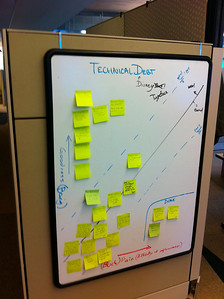
Bobby is doing these visits in the spirit of Corey Haines Journeyman Tours.  I’ve got a ton of respect for anyone that can coordinate time & effort to do this.  The amount of learning, open mindedness, and other characteristics are high on my list of awesome.  Cheers to your visit to Getty Bobby, it was good reading about your experience.  I must say, one of my favorite bits is the picture you got of the technical debt kanban.  Absolutely great idea!

Anyway that is all I’ve got for now.  Will probably do another wrap up sometime later in the week.  Until then, cheers!