Ugh, The Verbing Subjectized, Verbeeized!

Hello Blogosphere,

This is my short rant on two words that drive me nuts and often make fairly educated people sound stupid.

It reads, “- Produce well architected, efficient SQL within a complex data model. Demonstrate ability to troubleshoot database performance problems in applications written in ADO.NET, and VB.NET using SQL as the backend for data access.“

I’m not sure if I should even be very judgemental about someone using the faux word “architected” or “architect” as if it where a verb.  It just drives me nuts though and I’m no grammar Nazi.  It’s just like the other faux word “irregardless”.

For some context, that these words usually imply a lack of English acumen, please read on.

http://dictionary.reference.com/browse/irregardless has the faux word “irregardless” defined.  But what does it have written about this word?

“Irregardless is considered nonstandard because of the two negative elements ir- and -less. It was probably formed on the analogy of such words as irrespective, irrelevant, and irreparable. Those who use it, including on occasion educated speakers, may do so from a desire to add emphasis. Irregardless first appeared in the early 20th century and was perhaps popularized by its use in a comic radio program of the 1930s.”

So now we know, it is not a word.  Public speakers use it to show emphasis?  I know enough people that laugh, chuckle, and sometimes outright point out the problem with the word to public speakers.  So how about you public speakers up the ante a bit and stop using faux words!

For the faux word “architected”, just think of it like this.  One would not “architect” a “architecture”.  This is exactly how it is being used.  So the next time you’re slaughtering and beating the poor word architect by forcing into verb usage, think about what architecture you might be building and ask yourself why you’re picking on the poor architect.

So the next time one is writing, try to think through real word usage.  We humans have enough communication issues as it is, we don’t need extra help by overloading word usage even more than it already is.

Thanks,

ME
Smugmug and Windows Live Writer Plugin, via Teamprise Source Client

I officially joined the effort for the Windows Live Writer called smugmug4writer for Smugmug, currently maintained by Chris Patterson.  I’ve found myself using the plugin so much while writing entries that I finally decided I’d contact him and see about doing some additions.  If any readers use this application, make sure to leave a comment or three about what additions you might like.

Like any project on CodePlex you need to setup the utility to get the code out of their TFS (Team Foundation Server) Source Repository.  This is done with some tools Brad Wilson and crew are responsible for.  There is also another solution offered by Teamprise to connect to CodePlex Projects.

To download the tool for working on one of the CodePlex Open Source projects swing over to the CodePlex Open Source Project titled “CodePlex Source Control Client”.  To grab the Teamprise client swing over to their site.  You’ll also need to go pick up a free (as in beer) license for use.  It is subject to “approval” and all but I think they’re still sending them out to CodePlex users.

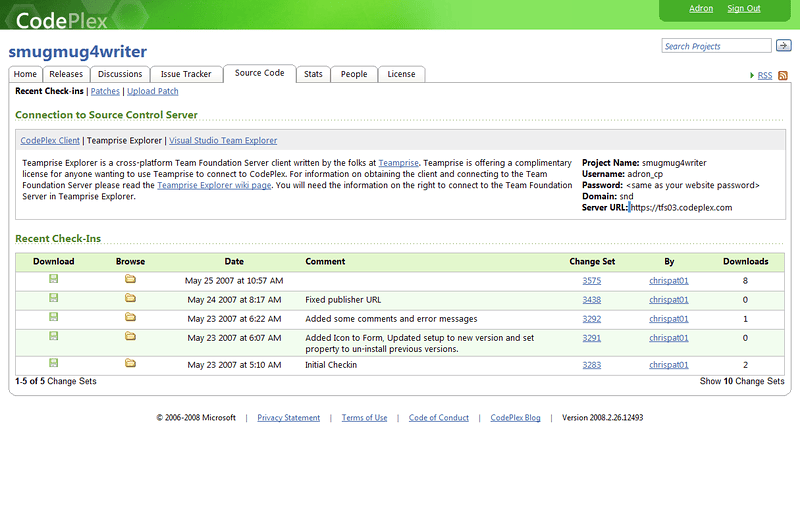
Once I downloaded the Teamprise Client I went to connecting up to the project.  First off go to the actual project page on CodePlex to find the specific details for connecting.  The connection details are located on the right hand side of the “Connection to Source Control Server” section.

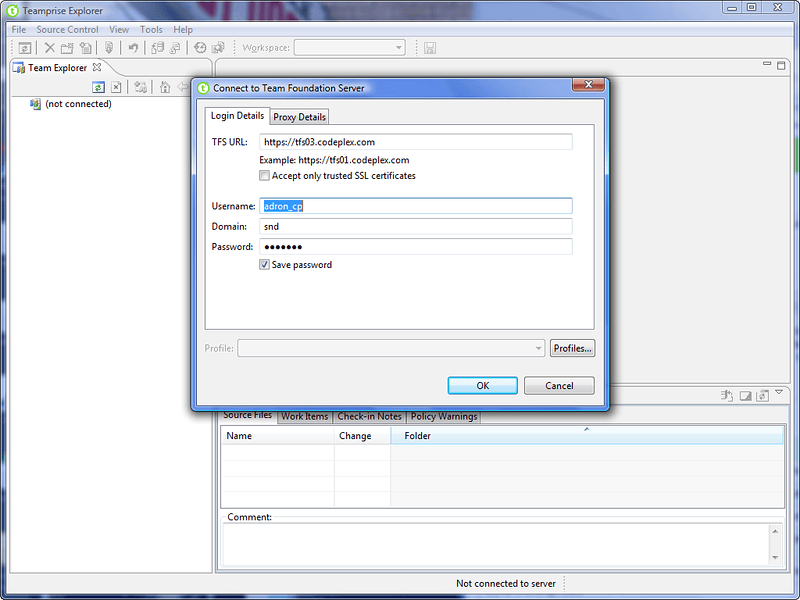
I got the Teamprise Explorer downloaded and installed.  Received my key also and entered that.  The first thing that pops up is the login details screen.  The odd thing is the _cp is stuck on the end of the username regardless of what the CodePlex username you have is.

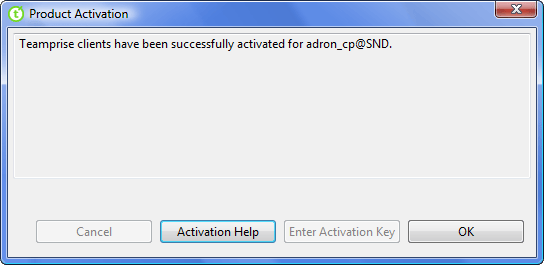
The next that will pop is an activation screen.  I just hit auto-activate and it took care of this itself.

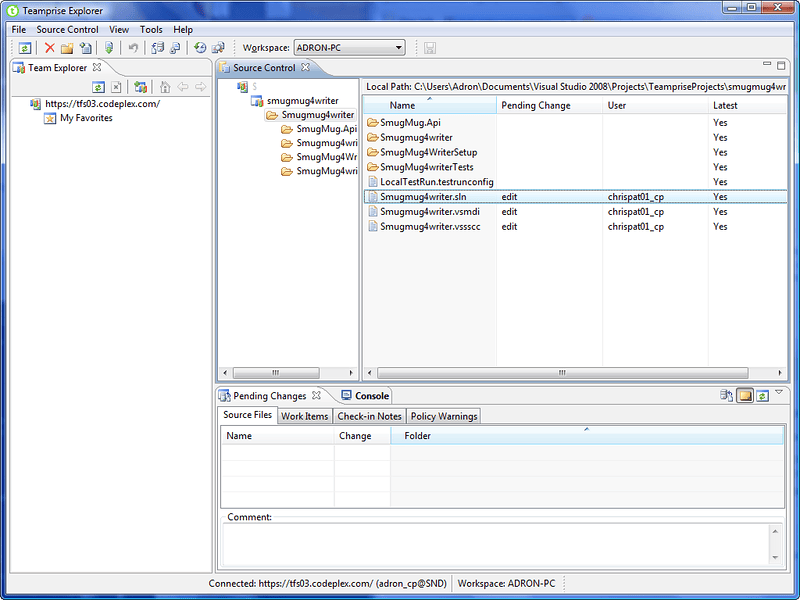
Below is the display of what the full screen looks like.  If you click on the root of the project (the $ symbol) in the Source Control section of the Teamprise Application below and right click…

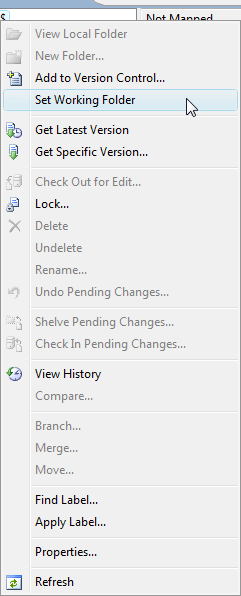
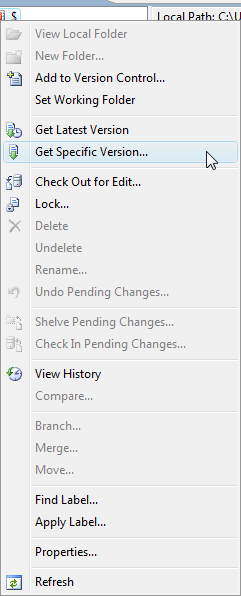
…this menu will appear.  Here you’ll see what are generally the standard options for access to TFS.  First things first, set your working folder for TFS.  This is the area where the code will be put.

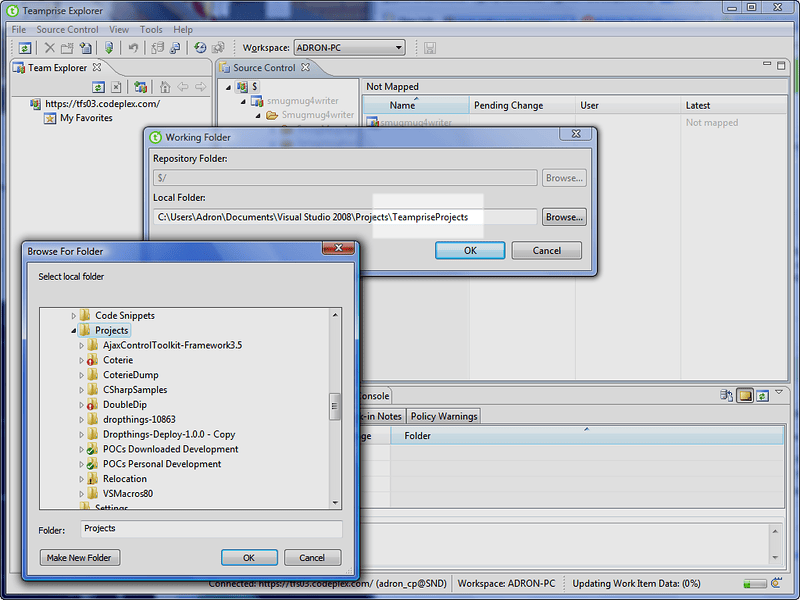
The working folder will prompt as below, click on Browse and select a directory.  I highlighted where I’ve added the specific directory that I want my code to be placed in.

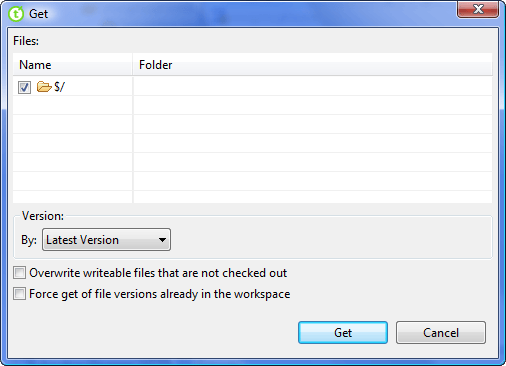
Next I right clicked on the root again and selected Get Specific Version…, the reason being that I don’t trust TFS with the simple Get Latest Version command.  I’ve been rubbed wrong by its performance and behavior in the past.  So I like to play it rough with ole’ TFS.

The next screen gives the standard options for getting a specific version.  Since there is nothing in the directory then I figured nothing needed selecting (here’s to hoping TFS behaves as designed).

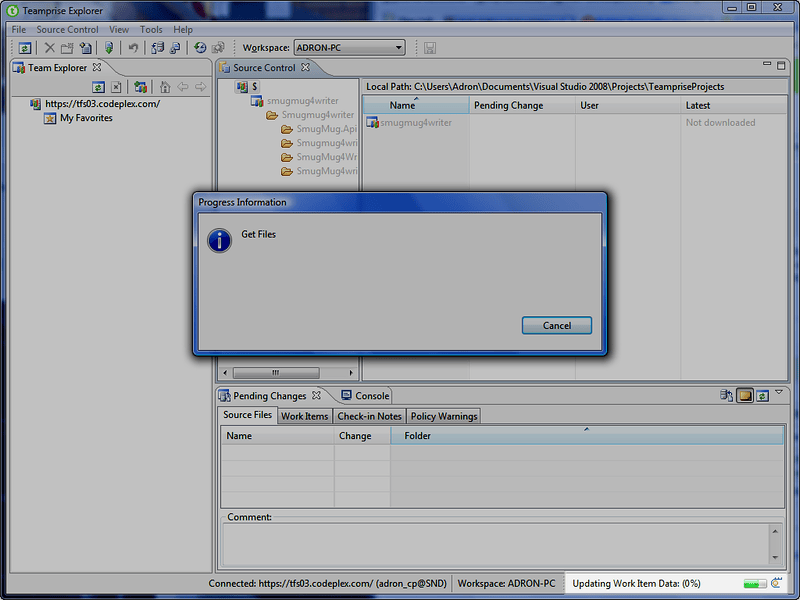
Next the application begins getting the latest files.  Notice that the notification dialog is rather boring and plain.  The real info is now displayed in the application, which has lost focus, but shows the active status down in the lower right hand side.  I’ve highlighted it below.

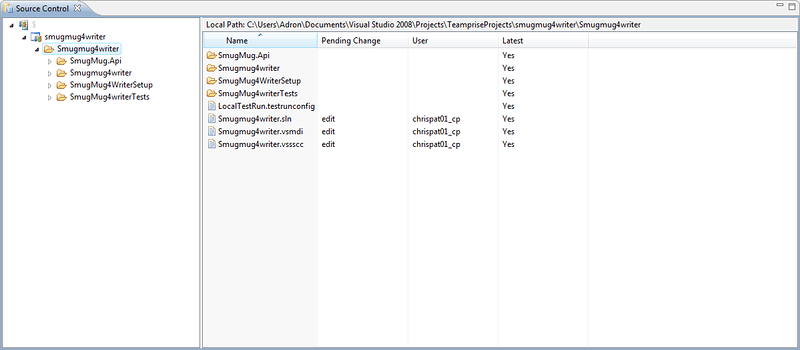
After all is retrieved the files are no longer shadowed out in the Source Control area.  Navigate to where you placed them in the directory structure on your machine and you’ll find that they’ve been downloaded accordingly.

…now get started on some open source CodePlex Projects.  I’ve explained it, so ya aint got no excuse do ya!  Stick out tongue [:P]

kick it on DotNetKicks.com

Technorati Tags: CodePlex,Teamprise,TFS,Team Foundation Server,Source Control,smugmug4writer

del.icio.us Tags: CodePlex,Teamprise,TFS,Team Foundation Server,Source Control,smugmug4writer

Kanban Ninja!

So over the next few weeks and days I’ll be pushing out a new development process, methodology and helping extensively with the consulting roles here at work.  My main goal is to make us FAST and to maintain quality and expand that.  One of the best ways to come upon mankind is of course, the Toyota way!  With that in mind I stumbled upon the Kanban Process Template for TFS, which we happen to be using (TFS, not Kanban).  I hope that I can also bring this into the work environment and gain even more productivity and gains in efficiency!  Go check it out yourself if you’re into the efficiency of doing things right, well, and downright top notch.

On another note, the ole’ gritty Portal Project that came out a long time ago has been updated too.  Utilizing .NET 3.5 and such it is now looking pretty cutting edge.  Go check it out too on CodePlex.

Technorati Tags: TFS,Kanban,CodePlex

del.icio.us Tags: TFS,Kanban,CodePlex

Xobni Rocks! More Analytics!

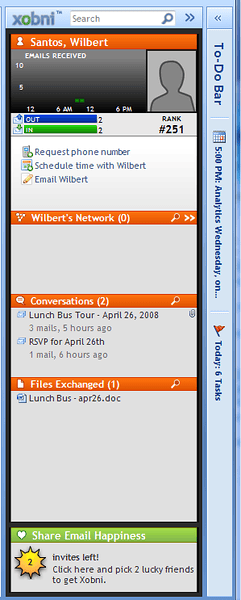
As I start my WebTrends blogging I also have stumbled onto some other analytics products and social information applications.  These help in general daily activities a LOT!  One that my buddy Eric Sterling showed me recently is Xobni.  Xobni basically keeps track and ranks all the e-mail addresses, phone numbers, and a lot of other information, then provides via a side bar a summary of that.

Just a few screen shots of the various capabilities.

This image is of the sidebar, with the To-Do Bar minimized right the the side of it.

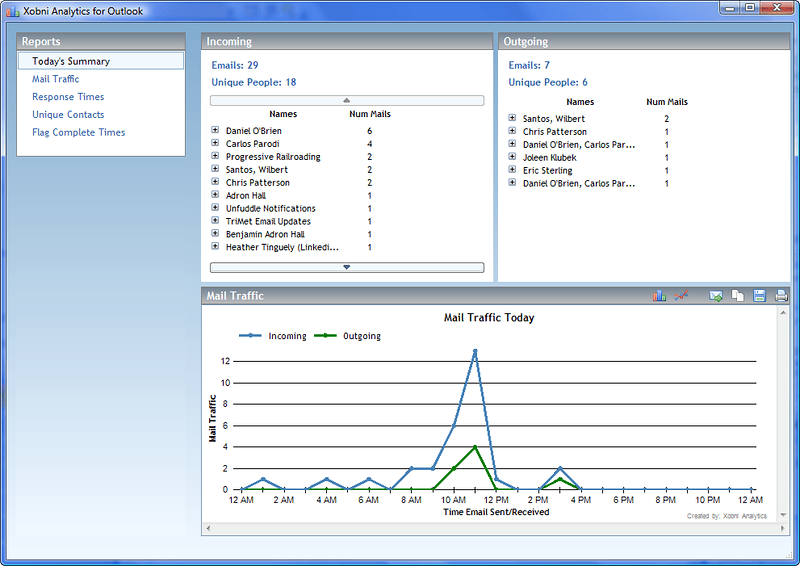
This is the analytics screen for outlook.  Analyzing the inbound e-mail, frequency of traffic, etc.

WebTrends Account Setup and Configuration

This is the e-mail one receives once the account is setup and ready for configuration.I got my WebTrends Account Welcome E-mail with all of the information needed to get connected and start working with the On Demand Analytics Web Application.

At some point I want to get a Visitor Intelligence Cube/OLAP Reporting Web Application setup too, but for now I’m just going to work on the ole’ site as is and get everything tagged appropriately.  In this blog entry though I’m going to go over real quick the basics of how easy it is to have a WebTrends Account setup.  In a later entry I’ll cover tagging the site for tracking purposes, tagging strategies, and other topics of the actual tracking that WebTrends Analytics performs.

I initiated contact (for me, since I work for WebTrends this a bit different than what it would be for most) and discussed getting an Analytics account setup for my blogging.  We then started the process of getting the account setup and a little later I received my introduction e-mail.

Once I received the e-mail I logged in to get my site started and just to peruse the basic links that are sent in the introductory e-mail.

[This is the initial login screen to the OnDemand Marketing Lab Site.](http://adronhall.smugmug.com/gallery/4723039_mFoon/1/279610262_CUHvk “This is the initial login screen to the OnDemand Marketing Lab Site.”)
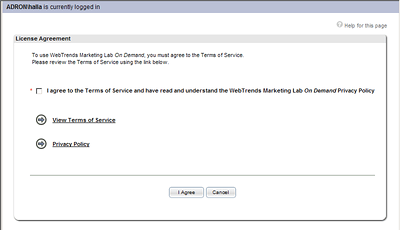
The first time login requires a quick acceptance of terms and then off to the main page.

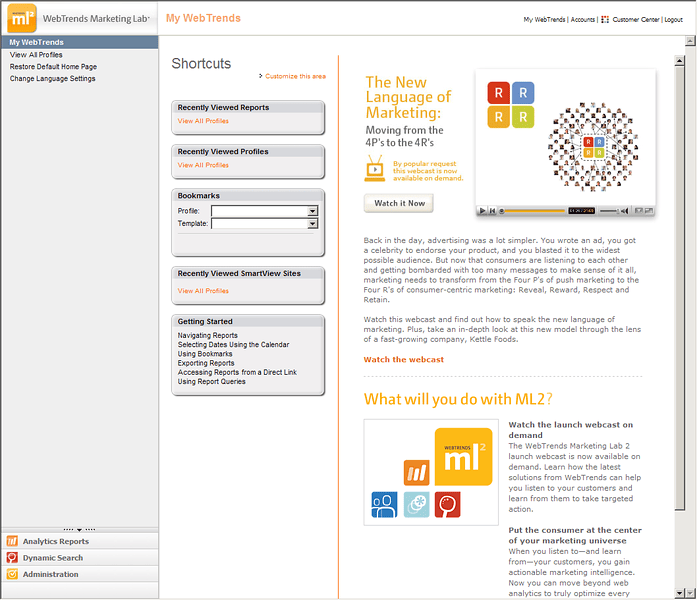
[Once you get logged in this is the initial screen that is displayed.](http://adronhall.smugmug.com/gallery/4723039_mFoon/1/279610214_uoZzN “Once you get logged in this is the initial screen that is displayed.”)

On the main page (shown above) you will find the navigation menu on the left and the content area on the right.  The left area has each of the purchases & available applications listed;  Analytics Reports and Dynamic Search.  At the very bottom is the Administration Bar.  The Administration section is the configuration area for practically all of the features in the various WebTrends Applications.  I’ll have something in my next WebTrends Entry related specifically to setting up and configuring the initial account.

In the Welcome E-mail links to some very important information is available.  The support and documentation areas of the On Demand Application.  The WebTrends On Demand Support area provides links for downloads, release notes, and a quick start guide that should be a required quick read.

[](http://adronhall.smugmug.com/gallery/4723039_mFoon/1/279610235_G5N6r)
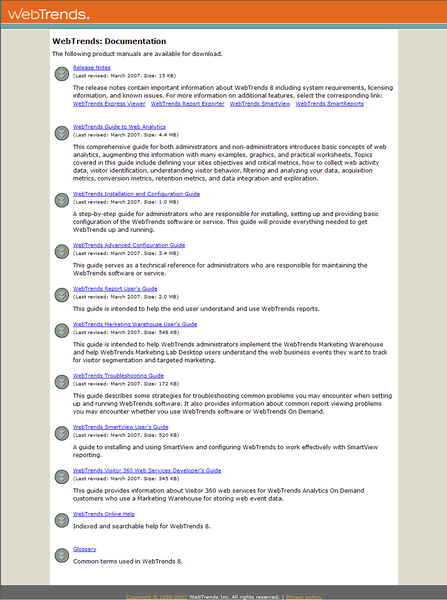
The other links go straight to the documentation.  This area has extensive documentation on tagging, advanced configuration, SmartView, installation and configuration, a guide to web analytics, and a whole bunch of other good reads.  As before, I suggest a lot of reading be done in this area for anyone using WebTrends Analytics.

Stay tuned for my next entry.  I’ll cover the basics on setting up a profile and data source for the nitty gritty of getting at the numbers.

Technorati Tags: WebTrends,Analytics,Web Analytics,SmartView,Dynamic Search

del.icio.us Tags: WebTrends,Analytics,Web Analytics,SmartView,Dynamic Search

Quote of the Day: Perhaps the best thing about the future is that it comes one day at a time. –Dean Acheson