




UPDATE: A subsequent post is available in refactoring this work with Chat GTP-4.
Ok, I’ve gotten deep into collecting music again, after just doing the *streaming* thing for a decade plus. In this deep dive back into music and playing, composing, collecting, reactions, reviews, live shows, and related worlds coming together I’ve found it might be interesting to put together a multi-tenant database to start collecting all my effort’s collateral data together. This, is the beginning of that journey.
I’ve got some tunes cranked as I’m all set to dive deep into this, let’s get it done!
Music has always been a significant part of my life. From the melodies that accompany my daily routines to the anthems of my most memorable moments, it’s been a constant. As my collection grew, I realized I needed a better way to organize it. That’s when I stumbled upon the concept of multi-tenancy databases and decided to give it a shot with PostgreSQL. Here’s my experience.
Why Did I Choose This Database?
My music collection started with a few albums but quickly expanded to encompass various genres, artists, and eras. I needed a structured way to keep track of everything. The multi-tenant music collector’s database seemed like the perfect solution because:
- Structure: It offers a well-defined schema that can capture everything I want.
- Collaboration: I can share my collection with friends and see their contributions.
- Audit: I can track every change, which is especially handy when multiple people are adding to the database.
- Scalability: If I ever decide to turn this into a service, this setup can easily serve multiple collectors.
What Did I Learn About Multi-Tenant Systems?
Before diving in, I had to understand what multi-tenancy meant. It’s a system where a single instance of software can serve multiple users, but each user’s data remains isolated and private. The shared database model, where all users share the same database but have their data separated by a unique identifier, seemed like a straightforward approach.
Setting Up the Database:
Step 1: Install Your Database (or get one running)
- PostgreSQL
Web Page URI: https://www.postgresql.org/
Download: https://www.postgresql.org/download/
Docker Image: https://hub.docker.com/_/postgres
As a Service Offerings: https://www.postgresql.org/support/professional_hosting/
- SQL Server
Web Page URI: https://www.microsoft.com/en-us/sql-server/
Download: https://www.microsoft.com/en-us/sql-server/sql-server-downloads
Docker Image: https://hub.docker.com/_/microsoft-mssql-server
As a Service Offerings: https://azure.microsoft.com/en-us/services/sql-database/
- MariaDB
Web Page URI: https://mariadb.org/
Download: https://mariadb.org/download/
Docker Image: https://hub.docker.com/_/mariadb
As a Service Offerings: https://mariadb.com/products/mariadb-sky/
- MySQL
Web Page URI: https://www.mysql.com/
Download: https://www.mysql.com/downloads/
Docker Image: https://hub.docker.com/_/mysql
As a Service Offerings: https://www.mysql.com/products/cloud/
Step 2: Create a New Database
Open the database (I’ll be using PostgreSQL this time) and create a new database for our music collector’s platform:
CREATE music_collectors;Now I switch over to be sure I’m using that database specifically.
USE music_collectors;Step 3: Create the Horse


Ya know, like this meme.
We’re at the “add small details” part.
So with that, here is the first draft of “small details”. I’ll elaborate on them after the following SQL.
-- Tenant table
CREATE TABLE tenants (
    tenant_id SERIAL PRIMARY KEY,
    name VARCHAR(255) NOT NULL,
    created TIMESTAMP DEFAULT CURRENT_TIMESTAMP,
    updated TIMESTAMP DEFAULT CURRENT_TIMESTAMP,
    notes TEXT,
    message TEXT
);

-- User table
CREATE TABLE users (
    user_id SERIAL PRIMARY KEY,
    tenant_id INT REFERENCES tenants(tenant_id),
    username VARCHAR(255) NOT NULL,
    password VARCHAR(255) NOT NULL, -- Hashed password
    created TIMESTAMP DEFAULT CURRENT_TIMESTAMP,
    updated TIMESTAMP DEFAULT CURRENT_TIMESTAMP,
    notes TEXT,
    message TEXT
);

-- Roles table
CREATE TABLE roles (
    role_id SERIAL PRIMARY KEY,
    tenant_id INT REFERENCES tenants(tenant_id),
    name VARCHAR(255) NOT NULL,
    can_add BOOLEAN DEFAULT FALSE,
    can_edit BOOLEAN DEFAULT FALSE,
    can_delete BOOLEAN DEFAULT FALSE,
    created TIMESTAMP DEFAULT CURRENT_TIMESTAMP,
    updated TIMESTAMP DEFAULT CURRENT_TIMESTAMP,
    notes TEXT,
    message TEXT
);

-- User roles mapping table
CREATE TABLE user_roles (
    user_id INT REFERENCES users(user_id),
    role_id INT REFERENCES roles(role_id),
    PRIMARY KEY (user_id, role_id)
);

-- Musician table
CREATE TABLE musicians (
    musician_id SERIAL PRIMARY KEY,
    tenant_id INT REFERENCES tenants(tenant_id),
    name VARCHAR(255) NOT NULL,
    date_of_birth DATE,
    biography TEXT,
    created TIMESTAMP DEFAULT CURRENT_TIMESTAMP,
    updated TIMESTAMP DEFAULT CURRENT_TIMESTAMP,
    notes TEXT,
    message TEXT
);

-- Band table
CREATE TABLE bands (
    band_id SERIAL PRIMARY KEY,
    tenant_id INT REFERENCES tenants(tenant_id),
    name VARCHAR(255) NOT NULL,
    formation_date DATE,
    genre VARCHAR(255),
    country_of_origin VARCHAR(255),
    city_of_origin VARCHAR(255),
    active_status BOOLEAN DEFAULT TRUE,
    biography TEXT,
    website VARCHAR(255),
    social_media_links TEXT,
    label VARCHAR(255),
    discography TEXT,
    manager_name VARCHAR(255),
    contact_email VARCHAR(255),
    created TIMESTAMP DEFAULT CURRENT_TIMESTAMP,
    updated TIMESTAMP DEFAULT CURRENT_TIMESTAMP,
    notes TEXT,
    message TEXT
);

-- Band members table
CREATE TABLE band_members (
    band_member_id SERIAL PRIMARY KEY,
    band_id INT REFERENCES bands(band_id),
    musician_id INT REFERENCES musicians(musician_id),
    start_date DATE,
    end_date DATE,
    contribution TEXT,
    created TIMESTAMP DEFAULT CURRENT_TIMESTAMP,
    updated TIMESTAMP DEFAULT CURRENT_TIMESTAMP,
    notes TEXT,
    message TEXT
);

-- Albums table
CREATE TABLE albums (
    album_id SERIAL PRIMARY KEY,
    band_id INT REFERENCES bands(band_id),
    title VARCHAR(255) NOT NULL,
    release_date DATE,
    created TIMESTAMP DEFAULT CURRENT_TIMESTAMP,
    updated TIMESTAMP DEFAULT CURRENT_TIMESTAMP,
    notes TEXT,
    message TEXT
);

-- Songs table
CREATE TABLE songs (
    song_id SERIAL PRIMARY KEY,
    album_id INT REFERENCES albums(album_id),
    title VARCHAR(255) NOT NULL,
    songwriter VARCHAR(255),
    duration TIME,
    created TIMESTAMP DEFAULT CURRENT_TIMESTAMP,
    updated TIMESTAMP DEFAULT CURRENT_TIMESTAMP,
    notes TEXT,
    message TEXT
);
That creates a database with an entity diagram that would look like this.
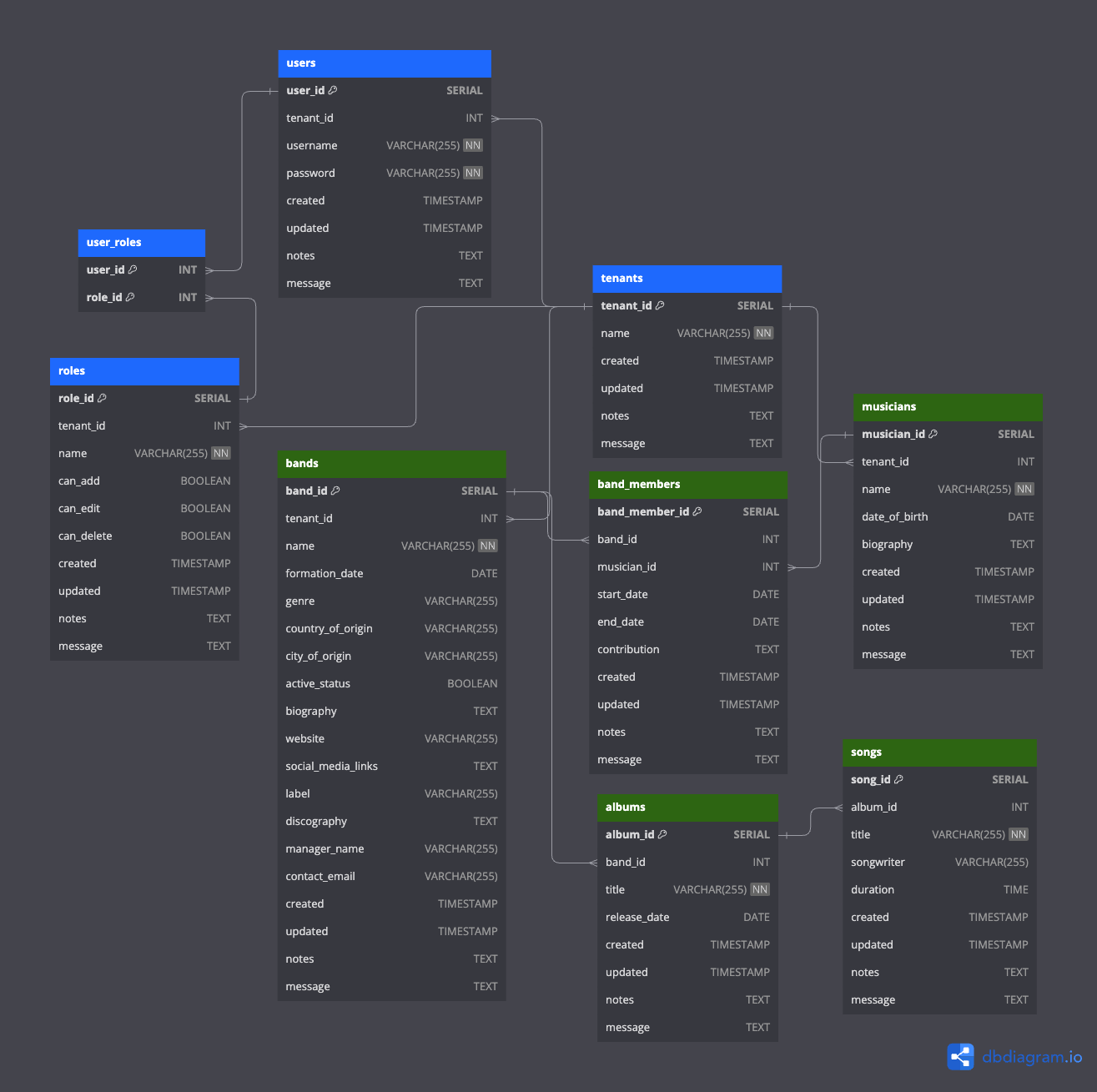
This schema provides a foundation for a multi-tenancy system using the shared database model. Each table has a tenant_id column to segregate data by tenant. The users and roles tables allow for user management and role-based permissions. The music-related tables (musicians, bands, band_members, albums, and songs) capture the details you specified. The default columns for audit purposes (created, updated, notes, and message) are also included in each table.
Let’s dive into the details of each table and their respective fields in the proposed multi-tenancy music collector’s database:
1. tenants Table:
- Purpose: To store information about each tenant (collector) in the multi-tenant system.
tenant_id: A unique identifier for each tenant.name: The name of the tenant or collector.created,updated,notes,message: Default audit columns to track creation, updates, and additional notes or messages.
2. users Table:
- Purpose: To manage the users associated with each tenant.
user_id: A unique identifier for each user.tenant_id: The tenant to which the user belongs.username: The username for login purposes.password: The hashed password for the user.created,updated,notes,message: Default audit columns.
3. roles Table:
- Purpose: To define different roles and their permissions for users within a tenant.
role_id: A unique identifier for each role.tenant_id: The tenant to which the role belongs.name: The name of the role (e.g., “Admin”, “Editor”).can_add,can_edit,can_delete: Boolean flags to determine the permissions associated with the role.created,updated,notes,message: Default audit columns.
4. user_roles Table:
- Purpose: To map users to their respective roles.
user_id: Reference to the user.role_id: Reference to the role.
5. musicians Table:
- Purpose: To store details about individual musicians.
musician_id: A unique identifier for each musician.tenant_id: The tenant to which the musician data belongs.name: The name of the musician.date_of_birth: The birth date of the musician.biography: A brief biography of the musician.created,updated,notes,message: Default audit columns.
6. bands Table:
- Purpose: To store comprehensive data about musical bands.
band_id: A unique identifier for each band.tenant_id: The tenant to which the band data belongs.name: The name of the band.formation_date: The date when the band was formed.genre: The musical genre of the band.country_of_origin,city_of_origin: Origin details of the band.active_status: Boolean flag indicating if the band is currently active.biography: A brief biography of the band.website: The official website of the band.social_media_links: Links to the band’s social media profiles.label: The music label associated with the band.discography: A list of albums released by the band.manager_name,contact_email: Contact details for the band’s management.created,updated,notes,message: Default audit columns.
7. band_members Table:
- Purpose: To store information about the members of a band and their contributions.
band_member_id: A unique identifier for each band member entry.band_id: Reference to the band.musician_id: Reference to the musician who is a member of the band.start_date,end_date: The duration of the musician’s membership in the band.contribution: Details about the musician’s contribution to the band (e.g., instrument played, songs written).created,updated,notes,message: Default audit columns.
8. albums Table:
- Purpose: To store details about musical albums.
album_id: A unique identifier for each album.band_id: Reference to the band that released the album.title: The title of the album.release_date: The date when the album was released.created,updated,notes,message: Default audit columns.
9. songs Table:
- Purpose: To store details about individual songs in albums.
song_id: A unique identifier for each song.album_id: Reference to the album containing the song.title: The title of the song.songwriter: The songwriter of the song.duration: The duration of the song.created,updated,notes,message: Default audit columns.
I’ve crafted a shared database model that’s both efficient and ensures data isolation (I hope, notice any mistakes here?). Let’s break it down.
The Tenancy Magic:
When I set out to design this, my primary goal was to ensure that each tenant’s data remains isolated, even though they all share the same database. The magic lies in a simple yet powerful concept: the tenant_id.
The tenants Table:
This is where it all begins. The tenants table is the cornerstone of our multi-tenancy system. Each tenant gets a unique tenant_id which acts as their unique identifier in our shared database.
tenant_id: This is the golden ticket. Every piece of data that belongs to a tenant will be tagged with this ID. It ensures that Tenant A’s data is never mixed up with Tenant B’s data.name: Just the name of the tenant or collector. Simple, right?created,updated,notes,message: These are my standard audit columns. They help track when data was added or changed and by whom.
The users and roles Tables:
Now, here’s where things get interesting. Each tenant can have multiple users, and each user can have specific roles. But how do we ensure that a user from Tenant A doesn’t accidentally get access to Tenant B’s data? You guessed it: the tenant_id.
Both the users and roles tables have a tenant_id column. This ensures that users and roles are always associated with a specific tenant. When a user logs in, we know exactly which tenant they belong to, and we can tailor their experience accordingly.
The Data Isolation:
Every time we add a new table to our database, whether it’s for storing details about bands, musicians, albums, or songs, we always include the tenant_id column. This acts as a filter. When Tenant A wants to fetch their list of bands, we use their tenant_id to filter out the bands that belong to them and only them. Tenant B, with a different tenant_id, will get their own separate list. It’s like each tenant has their own private room in a large music mansion.
The Heartbeat: musicians Table:
Music starts with the artist, and that’s precisely where our journey begins. The musicians table is where we store the soul of our collection.
musician_id: Every musician gets a unique ID. Think of it as their backstage pass in our database.name: The name of the musician. From Beethoven to Bowie, every name has a story.date_of_birth: A little trip down memory lane to when our stars were born.biography: Dive deep into their life, their struggles, their triumphs. Every note they play has a story, and this is where we tell it.
The Ensemble: bands Table:
Ah, the bands! Where musicians come together to create magic. The bands table is where we capture the essence of these musical groups.
band_id: The unique identifier for each band. It’s like their own VIP lounge access in our database.name: The name of the band. From “The Beatles” to “Nirvana”, every band has its own legacy.formation_date,genre,country_of_origin,city_of_origin: Dive into the roots of the band. Where did they start? What’s their style? Every detail adds a note to their symphony.active_status,biography,website,social_media_links: Stay updated! Are they still rocking the stages? Want to know more about their journey? Or maybe just stalk them on social media? We’ve got you covered.
The Crew: band_members Table:
Behind every great band are its members. The band_members table is where we celebrate these individual stars and their contributions.
band_member_id: A unique ID for each band member’s tenure in a band.start_date,end_date: When did they join the band? Did they go solo or join another ensemble? Track their journey here.contribution: Was it the mesmerizing guitar solos or the heart-touching lyrics? Know what they brought to the table.
The Masterpieces: albums and songs Tables:
Music is all about the tunes, and that’s what the albums and songs tables are all about.
album_id,title,release_date: Every album is a journey, a story. From its title to its release, we capture its essence.song_id,title,songwriter,duration: Dive into individual songs. Who penned those lyrics? How long does the magic last? It’s all here.
Wrapping Up:
Building this musical universe was like composing a symphony. Every table, every field, is a note that adds depth to our music collection. Whether you’re a seasoned collector or just starting out, this database is your ticket to a world of musical wonders. So, put on your headphones, dive into the data, and let the music take you away!
Until the next jam session, keep thrashing! 🤘🏻